
⚡Embric - Embroidery Calculator
Convert DST Files Easily
Upload, preview & download instantly


Free Online DST File Viewer — Preview & Convert Embroidery Files
Open any Tajima (.dst) embroidery file instantly in your browser — preview stitches, check stitch count, and export to PNG. No software, no signup, 100% free.
Drag and drop your embroidery files here
or
Supports: DST formats
⚡ Lightning-fast processing • 🔒 100% private — files never leave your device
DST File Viewer & Converter — Preview Embroidery Designs Instantly Online
Most embroidery owners and designers know this problem — you receive a DST file and need to check the stitch design, but opening it requires Wilcom or other expensive software installed on a PC. Or maybe your computer isn't even nearby when the question comes up. What if you just need a quick preview on your phone? So we built a way around it — no software, no waiting to get to a computer. We wanted embroidery shop owners and digitizers to open any DST file online — see the full stitch design, check stitch count, and export to PNG — from any device, without installing anything.
AtraKit DST Viewer solves this entirely in your browser. Upload your .dst file, get a full visual preview of the stitch layout, check production statistics like stitch count and density, view your thread color sequence, and download a PNG — all without installing anything and without your file ever leaving your device.
What is a DST File?
DST stands for Data Stitch Tajima. It is the most widely used commercial embroidery file format in the world, originally developed by Tajima Industries. Almost every commercial embroidery machine in use today can read a DST file, which is why it became the industry-standard production format.
Unlike image files, a DST file stores no colors, no visual graphics, and no font data. Instead it contains a sequence of 3-byte commands that tell the machine exactly what to do — move the needle to this coordinate, create a stitch, jump to the next section, trim the thread, or stop for a color change. The file starts with a 512-byte header containing metadata like design dimensions and stitch count, followed by the stitch data body.
- X/Y stitch coordinates encoded in delta (relative) format
- Jump stitch commands — movement without stitching
- Thread trim commands
- Color change stops — when to swap thread
- End of design command
- Header metadata: design name, dimensions, stitch count
Why Do You Need a DST Viewer?
Because DST files store machine instructions — not images — there is no way to visually inspect a DST file without a specialized viewer. Sending a DST file to production without previewing it first is one of the most common and costly mistakes in embroidery. A single misplaced stitch sequence, incorrect density, or wrong color stop can waste fabric, thread, and hours of machine time.
A DST viewer translates the raw stitch data into a visual diagram so you can see exactly what the machine will produce before it starts. This lets you catch errors early, verify design accuracy, confirm dimensions match your hoop, and share a preview with clients for approval — all before touching the machine.
- Catch stitch errors before they become production mistakes
- Verify design dimensions match your hoop size
- Confirm stitch count and density are within safe limits
- Check the color change sequence matches your thread plan
- Share a visual preview with clients for approval
- Maintain visual records of your design library
Open DST Files on Windows, Mac, iPhone and Android — No Software Needed
Standard operating systems do not include any built-in support for DST files. Windows, macOS, iOS, and Android all treat a .dst file as an unknown format and cannot display it natively. AtraKit DST Viewer removes this barrier — it runs directly in your browser so you can inspect any DST file from any device without downloading or installing a single thing.
Open DST Files on Any Device — No Software Needed
Windows, macOS, iOS, and Android have no built-in support for DST files — all four treat it as an unrecognized format. AtraKit DST Viewer works the same way on every device: open the tool in your browser, upload or drag in your .dst file, and the preview loads in seconds.
| Device | Browser | How to upload |
|---|---|---|
| Windows 10/11 | Chrome, Edge | Click Browse Files |
| Mac | Safari, Chrome | Drag and drop directly |
| iPhone/iPad | Safari | Browse Files → Files app / iCloud |
| Android | Chrome | Browse Files → phone storage / Drive |
How to Convert DST to PNG
DST files cannot be shared with clients or used on websites because no standard device can display them. Converting DST to PNG gives you a regular image file that works everywhere — in emails, WhatsApp, websites, Etsy listings, and approval documents.
To convert a DST file to PNG using AtraKit: upload your .dst file, wait a few seconds for the preview to render, then click Download PNG. The conversion happens entirely in your browser with no file size limit and no watermarks.
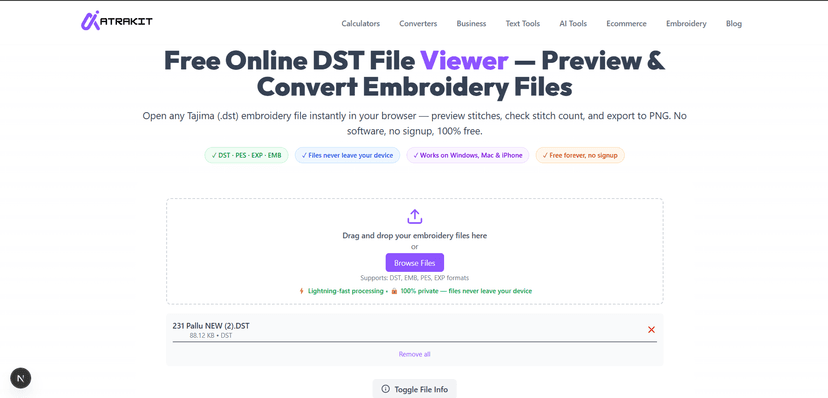
Step 1: Upload your DST file
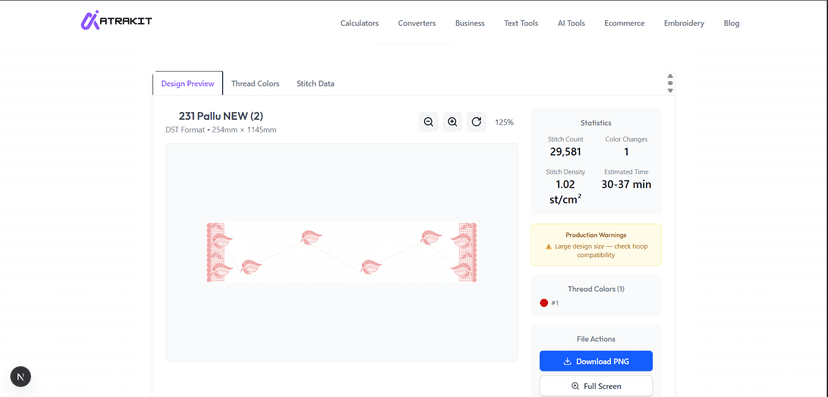
Step 2: Preview & Download PNG
- Share designs with clients via email or messaging
- Create product preview images for online stores and Etsy
- Use in catalogs, invoices, and production sheets
- Build a visual library of your embroidery designs
Common DST File Errors and What They Mean
High Stitch Density Warning
If stitch density is above 8 stitches per cm², the fabric can pucker, tear, or become stiff. High density is one of the most common causes of bad-looking embroidery. AtraKit automatically flags this when you upload your file.
Long Stitch — Exceeds 12.1mm Limit
The DST format has a hard limit of 12.1mm per stitch movement. Movements larger than this produce a loose thread on the fabric. This requires re-digitizing that section of the design.
Birdnesting
Birdnesting is when thread bunches up underneath the fabric creating a tangled mess. It is caused by incorrect tension, missing tie-in or tie-off stitches, or jump stitches that are too long. Previewing the design first and checking for these issues helps avoid it entirely.
Format Error on Machine
If your machine throws a Format Error, it usually means the file header is corrupted, a stitch exceeds the 12.1mm limit, or the file was saved incorrectly. Use AtraKit DST Viewer to inspect the file and identify the problem before sending it back for re-digitizing.
DST vs Other Embroidery Formats — Full Comparison
Choosing the right embroidery file format depends on your machine and workflow. Here is a full comparison of the most common formats:
| Format | Developer | Stores Colors | Editable | Best For |
|---|---|---|---|---|
| DST | Tajima | No | No | Universal commercial production |
| PES | Brother | Yes | No | Brother and Babylock home machines |
| JEF | Janome | Yes | No | Janome machines |
| EMB | Wilcom | Yes | Yes | Professional digitizing and editing |
| EXP | Melco | No | Yes | Melco machines and open format inspection |
| VP3 | Pfaff / Husqvarna | Yes | No | Pfaff and Viking home machines |
Practical rule: Work in an editable format like EMB or EXP during digitizing. Export to DST only for final production delivery — DST is accepted by virtually every commercial machine worldwide.
How AtraKit DST Viewer Works
AtraKit DST Viewer runs entirely in your browser using client-side JavaScript. When you upload a file it is read locally on your device — it is never sent to any server, never stored, and never shared. Here is what happens when you upload a DST file:
- The file is read as a binary ArrayBuffer in your browser
- A Web Worker parses the 512-byte header to extract design metadata
- The stitch body is decoded using Tajima's delta base-3 coordinate system
- Each stitch group is sorted by its color, then drawn onto an HTML Canvas element for the visual preview
- Production statistics are calculated: stitch count, dimensions, density, estimated machine time
- Quality warnings are flagged automatically if values exceed safe thresholds
- The canvas is exported as a downloadable PNG image
Key Features
- Instant stitch preview — full visual rendering in seconds
- Production statistics — stitch count, dimensions in mm, density, estimated machine time
- Thread color map — see each color stop visualized in order
- Quality warnings — automatic alerts for high density, oversized designs, excessive color changes
- Zoom, rotate, and full screen — inspect every detail up close
- Export to PNG — download a high-quality image of the design
- 100% private — all processing in your browser, zero file uploads
- No installation — works in Chrome, Safari, Firefox, Edge on any OS
Who Is This Tool For?
AtraKit DST Viewer is built for everyone who works with embroidery files — from large commercial shops running multi-head machines to individual hobbyists digitizing their first design.
- Embroidery businesses — quickly review client-submitted files before production
- Digitizers — verify stitch layout, density, and color sequence before delivery
- Machine operators — inspect files and check dimensions before loading to the machine
- Freelancers — create PNG previews to send to clients for approval
- Shop owners — manage and visually organize your design library
- Hobbyists — check designs before stitching on your home machine
- Beginners — learn how embroidery file structure works by inspecting real files
Limitations of the DST Format
- No color data: DST only records when a color change happens — not which color to use. Thread colors must be assigned manually from a thread plan.
- Not editable: To make design changes you must go back to the original editable format and re-export to DST.
- 12.1mm stitch jump limit: Each individual needle movement is capped at 12.1mm.
- No layers or objects: Everything is flattened into a single stitch sequence.
- No design scaling: Scaling a DST file changes stitch density and damages quality. Always digitize at the final production size.
Tips for Best Results
- Always preview a DST file before sending to the machine — catching errors on screen takes seconds, fixing them on fabric takes hours
- Keep stitch density below 8 st/cm² for most fabrics to avoid puckering
- Verify design dimensions match your hoop size before starting production
- Hold onto your original editable file separately — once you're working from DST, there's no going back to an editable version.
- Use PNG exports to share design previews with clients — far easier than sending DST files they cannot open
- Match thread colors from a physical thread plan — DST does not store color names or codes
Conclusion
Whether you run an embroidery shop, work as a digitizer, or stitch at home — this tool fits right into your daily workflow. No PC needed, no software to install. If you're outside, at a client's place, or just away from your desk — simply open your phone, upload the DST file, and see the complete stitch design within seconds. We built AtraKit DST Viewer so that checking a DST file feels as easy as opening a photo. Fast, free, and works from anywhere.
Related Tools
Frequently Asked Questions (FAQs)
What is a DST Viewer in embroidery?
A DST Viewer is a free online tool to open, view, and analyze .DST (Tajima) embroidery files — without needing expensive software like Wilcom or other professional programs.
How do I use a DST Viewer?
Simply upload your DST file and within a few seconds it will show you a full preview — you can zoom in, check the stitch details, and download it as a PNG image. No steps, no settings, just upload and see.
Can a DST Viewer edit embroidery designs?
No, DST Viewer is for viewing only — not editing. You can convert your DST file to PNG and see the full stitch layout, but to edit the actual design you'll need professional software like Wilcom or Hatch.
Why is a DST Viewer important for embroidery?
DST is the main file format used in embroidery machines — when you load a DST file into the machine, it reads those instructions and stitches the design onto the fabric, whether that's a saree, suit, or any other cloth. Before that happens, every embroidery owner wants to see exactly what the design looks like. That's what makes this viewer important — it's the last checkpoint before the machine starts.
Which file formats does a DST Viewer support?
Right now our tool fully supports .DST (Tajima) format — which is the most common file format used in commercial embroidery machines worldwide. We are working on adding more formats like PES and EXP in future updates.
What is a DST file?
A DST file is created by your digitizer and contains all the machine instructions for your embroidery design — where the needle moves, when to stitch, when to trim the thread.You load this file into your embroidery machine and it stitches the design directly onto your fabric.
How can I open a DST file online?
It's very simple. When you open the page you'll see a box that says 'Drag and Drop your embroidery files here' — just click on it, your file list will open, select the DST file you want to view and within seconds the full stitch design preview will appear on your screen.
Is this DST viewer free?
Yes, completely free — and there's no limit on how many times you use it.Nothing to pay, nothing to sign up for — open it and start uploading.
Are my files safe?
Yes, your files are 100% safe. We don't store any uploaded file anywhere — everything is processed locally in your browser and deleted the moment you close the tab.
Written by AtraKit Team
Building free tools for embroidery professionals
Last Updated: July 2026
Disclaimer: This tool is for viewing and basic conversion only. Thread colors shown in preview are approximate — always match colors manually from your digitizer's thread plan. Advanced editing requires professional embroidery software such as Wilcom, Hatch, or Brother PE-Design.