A dress seller from Surat was paying ₹95–₹100 shipping on every order. He wasn't entering wrong weight. His products were genuinely lightweight. The problem was his photo — a straight-from-camera shot, sitting at 4 MB, with the product taking up nearly the whole frame. After running it through this tool and uploading the optimized white background variant, his shipping dropped to ₹68–₹72 per order. On 150 orders a month, that's roughly ₹4,000 back every month — from one image change per listing. Upload your product photo, generate optimized variants, pick the one with the lowest shipping badge — and start saving from today.
Meesho Product Image Requirements for Lowest Shipping
Here's what Meesho's own listing guidelines call for on product images: Meeting these specifications is the baseline — our tool goes further by optimizing within these specs for the lowest possible shipping outcome:
- Aspect ratio: 1:1 square — no portrait or landscape images
- Minimum resolution: 500×500 pixels; recommended is 1000×1000 pixels
- File format: JPG — PNG files are significantly larger and cause higher shipping estimates
- File size: Optimized to 150–300 KB — large files above 500 KB consistently trigger higher shipping slabs
- Background: Clean, solid backgrounds preferred — white, light gray, or soft pastels perform best
- No text or watermarks: Meesho rejects images with overlaid text, logos, or promotional graphics
- Product framing: Product should occupy 62–70% of the image area — not touching edges, not floating too small
- No borders or frames: Decorative borders around images are not permitted
Our tool automatically meets all of these requirements. Every generated variant is a 1000×1000 JPG, no watermarks, clean solid background, product centered with correct framing, and file size optimized to the target range for each shipping tier.
Which Background Color Gives the Lowest Shipping on Meesho?
This is one of the most commonly asked questions among Meesho sellers. The answer is counterintuitive: background color itself does not directly determine shipping — file size does. However, background color has an indirect effect on file size through how JPEG compression handles different colors.
Light, uniform backgrounds — white (#ffffff), light gray (#f3f4f6), cream (#fef3c7) — compress extremely efficiently in JPEG format because large areas of uniform color are represented with very few data bits. A 1000×1000 image with a white background and centered product will compress to 30–40% smaller file size compared to the same product on a dark navy or deep purple background, at identical JPEG quality settings. This is why the Lowest Shipping variants in our tool use light pastel backgrounds — not for aesthetic reasons, but for compression efficiency.
Dark backgrounds like deep navy and deep purple, while visually premium and suitable for certain product categories, produce larger files even at lower quality settings. They are included in the Standard tier of generated variants for sellers who prioritize visual presentation and can afford the marginally higher shipping cost.
Where Sellers Usually Go Wrong With Product Photos
- Uploading raw smartphone photos: iPhone and Android cameras produce photos of 3–12 MB. Uploading these directly to Meesho without optimization is the single biggest cause of inflated shipping charges for new sellers. Always compress before uploading.
- Using PNG format instead of JPG: PNG files are typically 3–5× larger than equivalent JPG files for product photos. Meesho accepts JPG as the preferred format, and PNG files consistently result in higher shipping slabs.
- Product too large in frame: When the product fills 85–95% of the image, Meesho's system infers larger physical dimensions. Reducing the product to 62–67% of the frame with clean surrounding space significantly lowers the volumetric estimate.
- Dark or patterned backgrounds: Complex backgrounds — studio backdrops, wooden surfaces, fabric textures — dramatically increase file size at any given quality level because JPEG has to encode far more visual information. Stick to solid light colors.
- Adding text overlays or watermarks: Beyond violating Meesho's listing policy, text and graphics add data to the image file, increasing its size and pushing it into higher shipping brackets.
- Using the same image across all listings: Different products may benefit from different optimized variants. Always test which variant gives the lowest shipping for each specific product rather than applying one image style to your entire catalog.
Who Should Use This Meesho Image Optimizer?
This tool is built for every category of Meesho seller — from someone listing their first product to a high-volume supplier managing hundreds of SKUs:
- New sellers: Start your listings correctly from day one by uploading images that immediately qualify for the lowest shipping slab, rather than spending weeks troubleshooting high shipping charges after listing.
- Clothing and fashion sellers:For kurta and dress sellers specifically — white or light gray background with 62–65% product framing consistently brings listings back to the lowest slab, even if the same product was previously stuck at ₹85–₹100 shipping.
- Resellers and dropshippers: When you are not handling photography yourself and are using supplier-provided images, those images are almost never optimized for Meesho's shipping algorithm. Run every supplier image through this tool before uploading.
- High-volume catalog sellers: Use the Download All button to generate all 10 variants in one click, then batch-test which variant gives the lowest shipping for each product type in your catalog.
- Home décor and accessories sellers: These categories often have products that photograph large but are physically lightweight — candles, picture frames, cushion covers. The right image can keep these products in the lowest slab despite their apparent visual size.
How to Use This Tool Step by Step
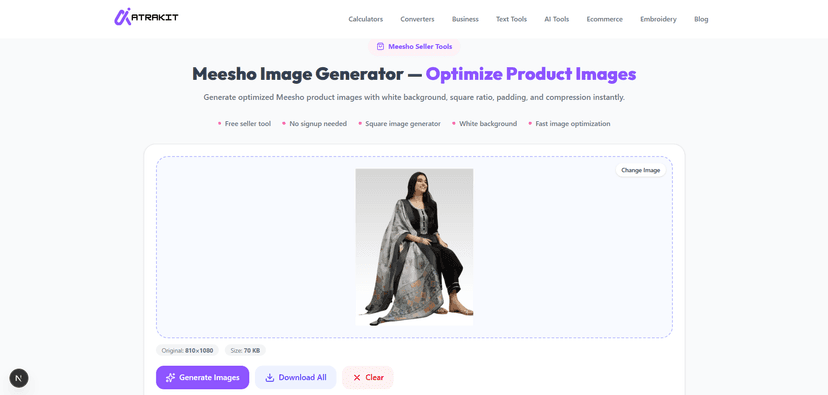
Step 1: Upload your product photo
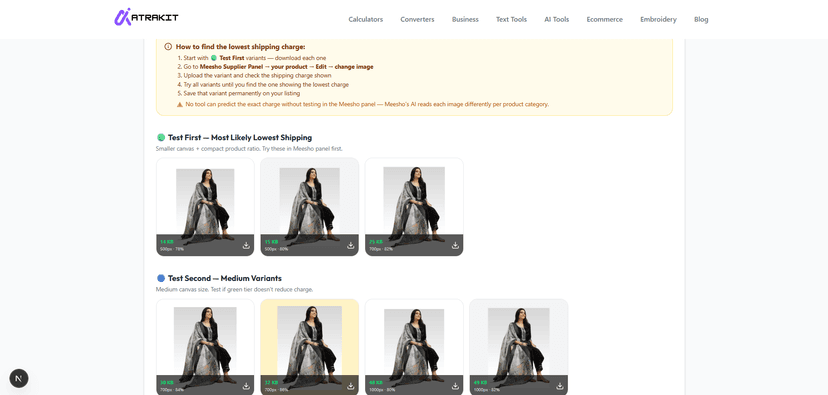
Step 2: Pick lowest shipping variant & download
- Click Upload Product Image or drag and drop your product photo into the upload area. The upload accepts JPG, PNG, or WebP — whatever format your photo is already in.
- Click Generate Images. The tool processes your image server-side and generates 10 optimized variants across three shipping tiers in a few seconds.
- Review the generated cards. Each card shows the background color, a shipping tier badge (green = Lowest, blue = Low, gray = Standard), and the exact file size in KB.
- Start with the green-badged variants — white, light gray, or cream backgrounds under 200 KB. Download the one that best suits your product's visual presentation.
- Upload the downloaded image to your Meesho Supplier Panel when creating or editing the listing. Check the shipping estimate shown in the panel — it should reflect the lower slab.
- If you need all variants for testing across multiple listings, click Download All to get all 10 images at once.
Pro Tips to Maximize Shipping Savings on Meesho
- Always cross-check the shipping estimate in your Meesho Supplier Panel after uploading the optimized image — the panel shows you the actual calculated shipping charge before the listing goes live.
- If you shoot product photos yourself, shoot against a plain white or light gray wall or backdrop. This makes optimization faster and produces the smallest possible files after compression.
- Enter your actual packed product weight accurately in the Supplier Panel. Image optimization handles the volumetric weight side — accurate weight entry handles the actual weight side. Both must be optimized together for the best result.
- For combo packs and multi-piece products, use a tightly framed image showing all items grouped compactly rather than spread out. A spread layout signals larger dimensions to the algorithm.
- Re-optimize existing listings that are currently on high shipping slabs. You do not need to create a new listing — simply edit the product image in the Supplier Panel and replace it with an optimized variant.
- Use light backgrounds consistently across your catalog for a clean, uniform store appearance that also keeps shipping optimized on every single listing.
Conclusion
It's simple — upload your product image, get your optimized low shipping image in seconds, and start using it in your daily Meesho listings from today. Nothing to figure out — upload a photo, and that's the whole learning curve. One image change per listing is all it takes. For sellers adding new products every day, this becomes part of the routine — upload photo, optimize, list. That's it. We built this because one seller asked for help with high shipping charges. If it helps you save even ₹20–₹30 per order, across hundreds of orders every month — that's real money back in your pocket.
Frequently Asked Questions (FAQs)
What is a Meesho Image Generator?
Meesho Image Generator optimizes your product photo and generates a new image specifically designed to reduce your Meesho shipping charges. Just upload your product photo — the tool automatically creates a low shipping ready image for you, completely free.
How does this tool help reduce Meesho shipping charges?
When you upload your image, the tool generates results in 3 categories — Test First (Most Likely Lowest Shipping), Test Second (Medium Variants), and Standard (Meesho Recommended Size). Start with the first category image, upload it to your Meesho Supplier Panel and check the shipping charge. Most sellers get their lowest shipping from the first category itself.
Can I reduce whitespace from product images for Meesho?
Yes — the tool automatically crops and frames your product with the right padding on all sides. You just upload your photo, the rest is handled automatically.
Is this Meesho Image Generator free to use?
Yes, completely free. We built this after one seller's shipping problem — there's no reason to paywall something that directly saves people money on every order. Generate as many variants as you need, for as many products as you're listing.
Can I generate Meesho-ready product images online?
Yes — everything runs in your browser. Upload your image, click generate, and within seconds your Meesho-ready optimized images are ready to download. No app, no software, no waiting.
Which image formats are supported in the Meesho Image Generator?
No need to convert anything first — JPG, PNG, and WebP all go straight in. On the way out, everything gets standardized to JPG, since that's what gives Meesho's algorithm the best shot at the lowest shipping tier.
Can I use this tool for ecommerce product listings?
This tool is built specifically for Meesho sellers — but the optimization works for any Indian ecommerce platform like Flipkart, Amazon, or Glowroad where image size affects listing performance.
Do I need to install software to use this Meesho image tool?
No installation needed at all — just open the page on any device, upload your image, and start generating. Runs the same whether you're on a phone between orders or sitting at a desktop — no difference in speed or result.
Written by AtraKit Team
Building free tools for ecommerce sellers in India
Last Updated: July 2026
